
Video SEO: How Video Content Actually Helps You Rank

“Will a video help our SEO?” We hear some version of that question on almost every discovery call, usually right after someone mentions that their homepage already has a brand video on it. The honest answer is yes, video can help you rank, but rarely in the way people expect. A video sitting on your homepage is not a ranking boost on its own, and in most cases Google isn't even indexing it as a video.
Video SEO is the practice of optimizing video content so it gets found in Google Search, on YouTube, and in AI-generated answers. It helps you rank in three ways: the video can rank by itself in YouTube and Google's video results, a properly built watch page can earn extra space on the results page, and a well-placed video can make the page around it more useful to the people who land there. Each of those depends on decisions made before and after the shoot, not on simply having a video.
Below, we'll walk through what actually moves rankings, where most business videos lose their search value, and the video SEO tips we use when planning productions for clients across Utah.
What Is Video SEO?
Video SEO covers everything that helps a video show up when someone searches for the topic it answers. That includes the obvious metadata (title, description, thumbnail, captions) and the less obvious parts: the page the video lives on, the structured data that describes it to Google, and whether the video's content matches what people actually type into a search bar.
A business video can be found in three places. The first is YouTube, which runs its own search engine and recommendation system. The second is Google Search, where videos appear in the main results, in the Videos tab, and sometimes with key moments that link straight to a section of the clip. The third is newer: AI Overviews and chatbot answers, which regularly pull in YouTube videos and video pages when they summarize a topic.
YouTube SEO for business and Google video SEO overlap, but they aren't the same thing. YouTube pays close attention to what viewers do after they click, such as whether they keep watching. Google cares more about whether it can find, understand, and index the video and the page it sits on. A good plan accounts for both.
Does Video Actually Help SEO? The Honest Answer
Video helps SEO when it can be indexed and when it answers a real search. Google only indexes videos that sit on a watch page, meaning a page whose main purpose is to show one video. A video added to a blog post or service page can make that page more useful to visitors, but it won't appear in video results from that page.
That last point surprises people, so here's where it comes from. Google's Search Console documentation states that “only videos that are on a watch page are eligible for indexing,” and it lists pages that don't qualify: a blog post where the video complements the text, a product page with a supporting video, and a category page that shows several videos with equal weight.
So the brand film on your homepage, the explainer halfway down your services page, the testimonial reel on your About page? Google treats those as page elements, the same way it treats a photo or a slider. It won't surface them as videos.
That doesn't make those videos worthless for search. A page that answers a question faster, keeps people around long enough to read your offer, and earns links because it's genuinely useful is a better page. In Wyzowl's 2026 State of Video Marketing survey, 82% of video marketers said video had increased traffic to their website, and the same share said it kept visitors on their site longer. Those are self-reported numbers from marketers, not ranking data, and Google has never confirmed time on page as a ranking factor. They do match what we see in practice, though: video makes good pages better. It doesn't rescue weak ones.
The Three Ways Video Content Helps You Rank
Once you separate the myth from the mechanics, video content ranking comes down to three paths. Most businesses only use one of them, and usually by accident.
1. The Video Ranks on Its Own
The most direct path is the video itself showing up in search. YouTube is where many people go first for “how to” and “what is” answers, and YouTube videos appear regularly in Google's main results and Videos tab. Wyzowl's 2026 survey found that 82% of video marketers upload their videos to YouTube, which makes sense: it's free, Google owns it, and its videos get indexed reliably.
For a local business, this matters more than it sounds. A three-minute video titled “How Much Does a Corporate Video Cost?” can rank on YouTube for that question, appear in Google's video results, and send viewers to your website, all without depending on your site's own rankings.
2. Watch Pages Earn Extra Space in Search Results
When a video sits on a proper watch page on your own site, it becomes eligible for Google's video features: video results on the main results page, Video mode, and key moments. Key moments are labeled timestamps in a search result that let someone jump straight to the part of a video that answers their question. Google lets you set them with structured data or, for YouTube videos, with timestamps in the video description.
That's extra real estate. A result with a thumbnail and a row of labeled moments takes up more of the screen than a plain blue link, and it shows the searcher exactly what they'll get before they click.
3. Video Makes the Page Around It More Useful
The indirect benefit is what most marketers mean when they say video helps SEO. A service page with a short, clear video gives visitors a faster way to understand what you do. Add a transcript or written summary underneath and you've also added relevant text that Google can read, which matters because Google doesn't watch your video the way a person does.
In our experience, the pages that gain the most are the ones where video explains something text struggles with: what a process looks like, how a space feels, how a product works in someone's hands. Useful pages also earn links. A good explainer gets shared, embedded, and referenced in ways a block of copy rarely does, and those links do help rankings.
Where Most Business Videos Lose Their SEO Value
We've produced and reviewed a lot of business video, and the same few problems keep showing up. None of them are about video quality. They're about what happens after the final export.
What we see | What Google sees | The fix |
Brand film embedded in the homepage hero, autoplaying on mute | A homepage with a decorative video and no indexable video | Keep it there for visitors, and give it a watch page and a YouTube upload |
Uploaded to YouTube as “Final_v3_Export” with no description | A video with almost no topic signals | Title it for a real search and write a description with timestamps |
Vimeo link set to private, embedded across the site | Nothing it can index | Use a public host for any video you want found |
No captions, or auto-captions full of errors | Less text to understand the topic | Upload a corrected caption file |
One three-minute video covering every service | A video with no clear match to any single search | Cut topic-specific versions from the same footage |
Thumbnail is whatever frame the platform picked | A result few people click, even when it ranks | Plan and capture a thumbnail frame on set |
The common thread is that the video was treated as a finished product instead of a piece of content that needs a home, a title, and a job. That's fixable, and most of the fixes start earlier than you'd think.
Video SEO Starts in Pre-Production

This is where a production company sees things a typical SEO guide doesn't. Most video SEO advice starts after the video exists: write a better title, add tags, fix the thumbnail. All of that helps. But the decisions with the biggest effect on whether a video gets found are made before anyone sets up a light.
Pick the Search Before You Write the Script
If you want a video to rank, you need to know what someone would type to find it. “Company overview video” isn't a search anyone makes. “How long does video production take” is. We'd rather spend thirty minutes on keyword research while scripting than days trying to fit a title onto a video that was never built to answer anything. It's the same reason we recommend getting your video strategy in place before you need a camera.
Answer the Question Early, Out Loud
Viewers decide within seconds whether a video is worth their time, and on YouTube that decision shapes how widely the video gets shown. Script the opening so it confirms the viewer is in the right place and starts answering right away. Say the main phrase on camera, naturally. Spoken words end up in captions and transcripts, which gives both YouTube and Google more text to work out what the video covers.
Plan Chapters at the Storyboard Stage
Key moments work best when a video has clean, natural sections. Storyboard a video with four clear segments and you get four timestamps that map to four real questions. Trying to carve chapters out of a video that flows as one continuous piece usually produces awkward labels nobody clicks.
Shoot for More Than One Video
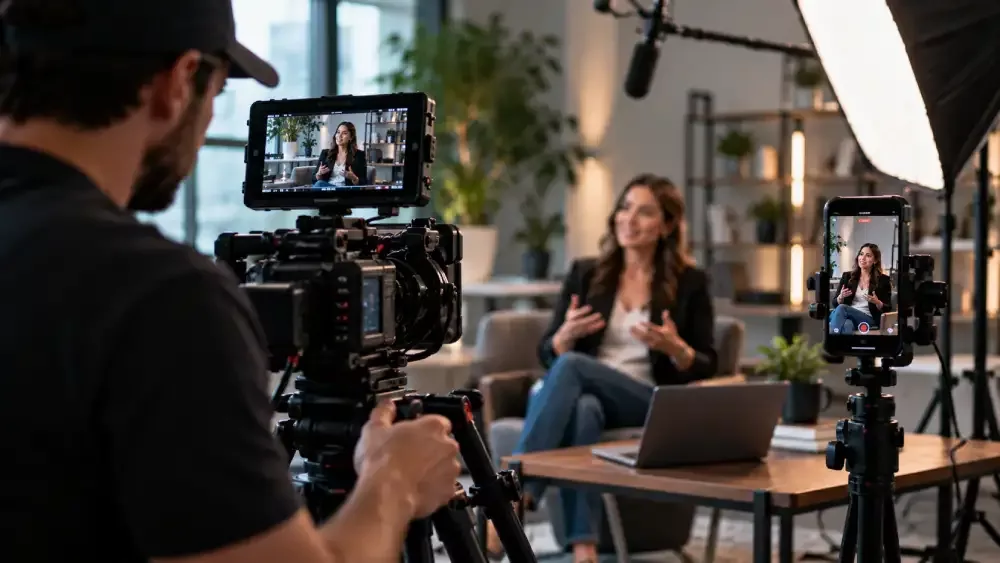
One production day can feed a full-length watch-page video, a YouTube version, and several short cutdowns for social. Planning those versions up front, including framing for vertical and square aspect ratios, costs far less than a second shoot. It also gives you several chances to match different searches with the same footage. When we plan corporate video production for clients, the shot list usually covers the cutdowns before the long-form edit is even scripted.
One more on-set habit worth adopting: capture a deliberate thumbnail frame. A clean, well-lit shot of a face or the product, with room for a short text overlay, beats any frame pulled from the middle of an interview.
Video SEO Tips for After the Video Is Finished
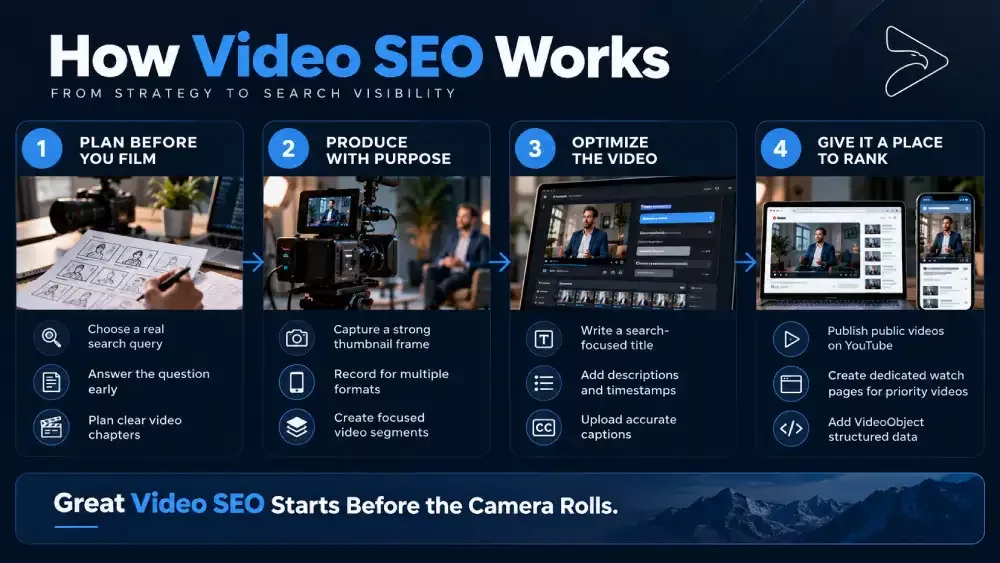
Once the edit is locked, this is the checklist we run through. These video SEO tips apply whether you made the video in-house or with a production partner.
Title it for the search, not the project. Lead with the phrase someone would type and keep it plain. “Corporate Video Production Process: What to Expect” will beat “Our Process” in search every time.
Write a real description. On YouTube, the first lines show in search results, so open with what the video answers. Add timestamps for each section, since Google can use YouTube description timestamps to create key moments.
Upload accurate captions. Auto-captions are a starting point, but they misspell names, products, and industry terms. Corrected captions give search engines clean text and help viewers who watch on mute or can't hear the audio. The World Health Organization estimates that over 5% of the world's population, about 430 million people, has disabling hearing loss.
Give important videos a dedicated watch page on your site. One video near the top, a clear title, a short description, and the transcript below. This is the page Google can index as a video page. You can still embed the same video on your homepage and service pages for visitors.
Add VideoObject structured data and a video sitemap. Structured data tells Google the video's title, description, thumbnail, upload date, and duration. Google recommends it even when you embed a YouTube or Vimeo player on your own page.
Keep thumbnail and video URLs stable. Google's documentation notes that if a thumbnail URL changes too often, it may not be able to index the video.
Group related videos into playlists. On YouTube, playlists keep viewers watching your content longer and make it clearer what your channel covers.
Connect the video and the website. Put a relevant page link near the top of the YouTube description and embed the video on matching pages. That's how YouTube viewers turn into website visitors.
YouTube or Your Website: Where Should Your Video Live?
Both, with different jobs. YouTube is where your video gets discovered by people who don't know you yet. Your website is where you control the experience, present your offer, and turn interest into a call or a form submission.
Here's the split we usually recommend. Upload educational, question-answering videos to YouTube as public videos, then embed them on matching pages of your site. Build a dedicated watch page on your own site for the few videos that matter most, like a flagship brand film or a core service explainer. For private or client-only content, use a host with privacy controls and accept that those videos aren't meant to be found. If you're weighing platforms, our comparison of YouTube, Vimeo, and Wistia goes into the tradeoffs.
How to Tell If Your Video SEO Is Working
Check three places. In Google Search Console, the Video indexing report shows which pages have indexed videos and why others don't, including videos that aren't on a watch page. In YouTube Studio, the traffic source reports show how many views come from YouTube search and which search terms brought people in. In your own analytics, look at whether people who reach your video pages go on to contact you, because rankings that don't turn into leads aren't worth much.
Give it time. Videos, like any content, can take months to settle into search results, and a single video rarely changes much by itself. A steady library of focused videos, each tied to a question your buyers actually ask, is what builds visibility.
Frequently Asked Questions About Video SEO
Does video help SEO?+
Yes, when the video can be indexed and answers a real search. Videos on YouTube and on dedicated watch pages can rank on their own in Google and YouTube results. A video embedded in a blog post or service page won't be indexed as a video there, but it can still make the page more useful to visitors.
Does embedding YouTube videos help SEO?+
Embedding a YouTube video can make a page more helpful, but it doesn't directly boost that page's rankings. Google treats a video that supports the text as a page element, not the page's main content. To get more from an embed, add a written summary or transcript and make sure the video fits the page topic.
What is video SEO on YouTube?+
YouTube video SEO is optimizing a video so YouTube's search and recommendation systems show it to the right viewers. That means a search-based title, a clear description with timestamps, accurate captions, a strong custom thumbnail, and content that holds attention. Because Google also shows YouTube videos in its results, good YouTube SEO often improves your Google visibility too.
Can a video rank on Google without being on YouTube?+
Yes. A video hosted on your own site or on a platform like Wistia can appear in Google's video results if it sits on a dedicated watch page, uses stable URLs, and includes VideoObject structured data. Google indexes it based on your page rather than a third-party platform.
Do I need a transcript for video SEO?+
A transcript isn't required, but it's one of the most useful additions you can make. It gives Google readable text about what the video covers and helps visitors who prefer skimming to watching. On a watch page, place it below the video so the video stays the main content.
The Bottom Line on Video SEO
Video can help you rank, but only when it's built to be found. A video embedded on a page as decoration won't do much for search. A video planned around a real question, given a proper home on YouTube or a watch page, and described clearly to Google can bring in traffic your text pages never would. Most of that work happens at the planning stage, which is also when it costs the least to get right.
Planning a Video That Needs to Be Found?
If you're producing video and want it to do more than sit on your homepage, we can help you plan it with search in mind from the first script draft. Take a look at our video marketing services or book a free strategy call to talk through what you want your video to rank for.
Start Your Project
Ready to Bring Your Story to Video?
Book a free strategy call, and we'll help you figure out which type of video will deliver the best ROI for your business.