Video Aspect Ratios Explained: Every Ratio You Need for Brand Video
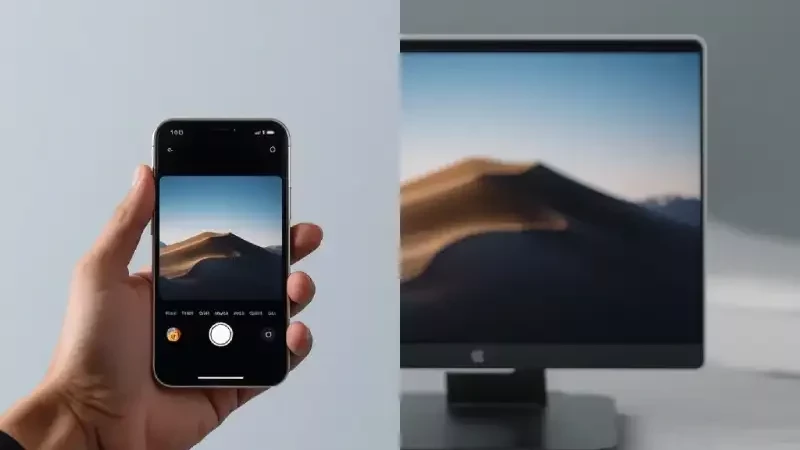
A video aspect ratio is the proportional relationship between the width and the height of your frame, written as two numbers with a colon between them. The standard for web and broadcast video is 16:9, also written 1.78:1. Vertical social video is 9:16. Square is 1:1. Feature films usually sit at 1.85:1 or 2.39:1.
That is the short answer, and it is the answer most articles stop at. Here is the part that actually costs money: you almost never need one ratio. You need three or four of them from the same shoot, and whether you get them cleanly depends on decisions made on set, not in editing. We have spent years shooting corporate and commercial work around Salt Lake City, and the single most expensive mistake we see is a client who paid for beautiful footage in one shape and then needed it in another.
This guide covers every ratio you are likely to encounter, which one belongs where, and how to get all of them out of a single production day.
What an aspect ratio actually is (and what it is not)
Aspect ratio is the shape of the frame. It says nothing about how many pixels are inside that frame. A 16:9 video can be 1280x720, 1920x1080, 2560x1440 or 3840x2160. All four are the same shape. Only the resolution changes.
You will see ratios written two ways. The colon form (16:9) compares width to height directly. The decimal form (1.78:1) divides the width by the height, which is how the film industry has always written it. They mean the same thing: 16 divided by 9 is 1.78. When someone says a film was shot in "scope," they mean 2.39:1, which is roughly two and a third times wider than it is tall.
Ratio matters because every player and every feed decides what to do with a video whose shape does not match its container. It either crops your picture, or it adds bars. YouTube describes this plainly: the player adapts to each video, and vertical content on a desktop screen gets padding that "appears white normally or dark gray when Dark theme is turned on" (YouTube Help). Those bars are not a bug. They are the platform protecting your framing because you handed it the wrong shape.
16:9, the ratio you will use most
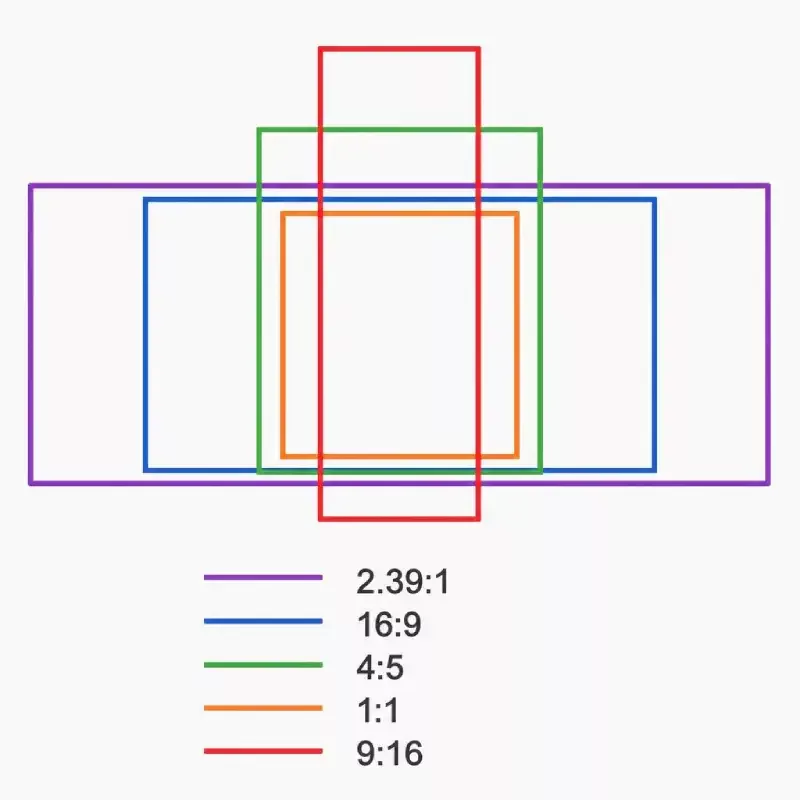
16:9 (1.78:1) became the international HDTV standard and is now, in the words of the reference literature, "universal for high-definition television" (Wikipedia)). It is the default for YouTube, for embeds on your own site, for Vimeo, for broadcast, for conference room screens and for nearly every presentation deck.
YouTube publishes its recommended upload resolutions for 16:9, and they are worth knowing because they set the ceiling on quality: 7680x4320 for 8K, 3840x2160 for 4K, 2560x1440, 1920x1080, 1280x720 and down (YouTube Help). For most business video, delivering a 1920x1080 master and archiving the 4K original is the right call.
Where 16:9 falls down is the phone held upright. On a vertical screen, a horizontal video occupies a band across the middle, roughly a fifth of the display, with the rest given to the interface or to empty space. If the majority of your audience meets your video inside a social feed, 16:9 alone is a handicap. That is not a reason to abandon it. Your website, your commercial video production work and your YouTube channel all still want it.
9:16, the vertical ratio
9:16 (0.56:1) fills a phone screen held the normal way. It is the shape of Instagram Reels, TikTok, YouTube Shorts, Facebook Reels and every Stories placement. The working resolution is 1080x1920, and current platform guidance recommends 9:16 for Reels and TikTok in-feed video (Sprout Social social media video specs, updated May 2026).
Vertical grew out of behavior, not preference. Phones are held upright, so the format that fills the screen wins attention. The reference literature dates the shift to "the widespread use of smartphones," and every major platform has followed it.
The trap is treating 9:16 as an afterthought. A vertical cut made by cropping the middle out of a horizontal frame will work if the shot was planned for it, and will fail if it was not. Crop a wide two-shot interview to 9:16 and you cut one of the two people out of the picture. There is no software fix for a person who is not in the frame. Vertical is a deliverable you plan for, not a rescue you attempt in post.
4:5, the feed ratio most people forget
4:5 (1.25:1) is a tall rectangle, not quite vertical. Its working size is 1080x1350, and it is the recommended shape for the Instagram feed (Sprout Social). It exists for a simple reason: it claims more vertical screen space than a square without demanding a fully vertical edit, so a 4:5 crop of well framed 16:9 footage usually survives intact.
If you only have budget to add one extra ratio to your 16:9 master, and your audience lives in the Instagram or Facebook feed rather than in Reels, 4:5 is the one to add.
1:1, the square
1:1 lost ground when Instagram opened up to other shapes, but it has not disappeared. Square still earns its place in paid campaigns that run across several placements at once, in LinkedIn feed video, in email, and anywhere a video sits inside a grid next to other content. It is the safe shape when you do not control where the file ends up.
Its weakness is that it wastes screen on both a phone and a desktop. Treat 1:1 as an ad format rather than your primary deliverable.
The cinematic ratios: 1.85:1, 2.39:1 and 2:1
When a client says they want something "cinematic," this is usually what they are pointing at.
1.85:1 is the American theatrical standard, introduced by Universal Pictures in May 1953, and one of the two common digital cinema formats. In the industry it is called "flat." It is only slightly wider than 16:9, which makes it the gentlest way to add a filmic feel without losing much picture.
2.39:1 is modern anamorphic widescreen, the shape of most large studio releases. It has been the 35mm anamorphic standard since 1970, when the specification was changed to 2.39:1 "in order to make splices less noticeable." This is the ratio that produces the wide letterbox bars people associate with film.
2:1, sometimes called Univisium, sits between the two. It was popularized by Red Digital Cinema cameras and has been adopted by streaming productions and some high-end phones. It reads as cinematic while staying easier to crop than 2.39:1.
All three ratio values above come from the standard reference on image aspect ratios (Wikipedia)).
Now the practical warning. A 2.39:1 video played in a 16:9 web player shows black bars above and below, which is usually the intent. But that same 2.39:1 frame is a poor source for a vertical cut, because you threw away the top and bottom of the sensor to get the width. If a piece has to live as a brand film and as a Reel, shoot 16:9 or 4K open gate and add the cinematic crop as a creative choice in the edit, not as a shooting format you can never undo.
For a documentary or a brand film that will live on a website and at an event, scope is a good decision. For a product explainer that has to be cut for six placements, it is an expensive one. This is exactly the kind of trade-off worth settling during video consulting before anyone books a crew.
4:3 and 1.43:1: when older ratios still make sense
4:3 (1.33:1) was, as the reference literature puts it, "the universal video format of the 20th century." It ran television and early cinema and then disappeared from consumer screens. It comes back for three legitimate reasons: you are cutting in archival footage that was shot that way, you want a deliberate period feel, or you need a frame that crops well to both horizontal and vertical, which 4:3 does better than 16:9.
You may also run into the Academy ratio at 1.375:1, which was near universal in films between 1932 and 1953, and IMAX at 1.43:1, shot on 70mm film run horizontally through the camera. Neither is a practical delivery format for business video, but if a client asks for "that IMAX look," 1.43:1 is the number they are describing.
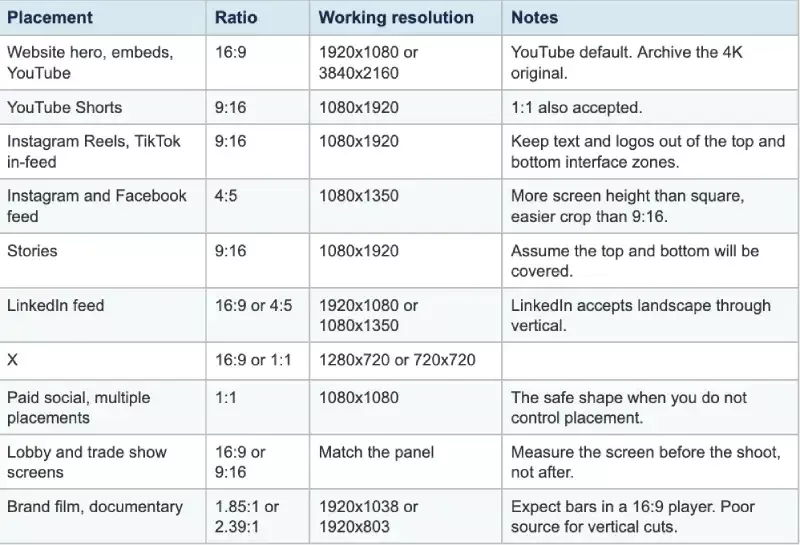
Quick reference: which ratio for which placement
Shoot once, deliver four ratios: how it actually works
This is the section the ranking articles leave out, and it is the only one that changes what you pay. Every guide will tell you 9:16 is for TikTok. Almost none will tell you how to walk away from one shoot day with a 16:9 master, a 9:16 cut, a 4:5 cut and a square ad that all look intentional.
1. Protect framing on set
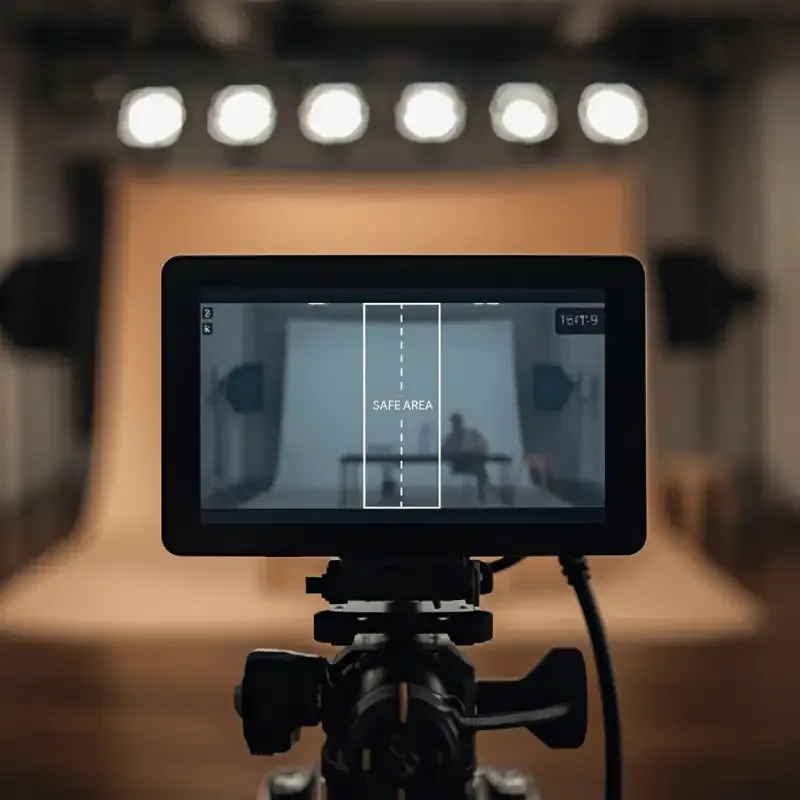
The reason we shoot 4K for clients who only asked for a 1080p video is not sharpness. It is crop headroom, and the arithmetic is easy to check.
Start with a 3840x2160 frame. Crop it to 9:16 at full height and you get 1215 pixels of width (2160 multiplied by 9, divided by 16). That is more than the 1080 you need for a vertical delivery, so you can slide the crop left and right to reframe a shot and still finish at full quality. Crop the same frame to 4:5 at full height and you get 1728 pixels of width, far more than the 1080 a 1080x1350 feed post needs.
Do the same exercise starting from a 1920x1080 master and the 9:16 crop is only 607 pixels wide, which has to be scaled up to 1080 and looks like it. That is the whole argument for shooting 4K on a job with a 1080p deliverable.
On the day, protect framing means a few concrete habits: keep the important subject inside the central vertical third, avoid wide two-shots for anything that needs a vertical version, watch the edges of the vertical guide for a boom or a light stand that a 16:9 frame hides, and shoot at least one deliberately tight option of every key moment. Our full-day shoot walkthrough shows where this fits into a normal production schedule.
2. Put the ratios in your deliverables list, in writing
Ask for these by name in the scope of work, before the shoot:
16:9 master, 1920x1080, and the 4K original archived
9:16 cut, 1080x1920, with burned-in captions
4:5 cut, 1080x1350
Optional 1:1, 1080x1080, if you are running paid social
Short cutdowns of each, typically 15 and 30 seconds
A clean version with no lower thirds or text, so the footage can be reused later
An .srt caption file alongside the burned-in versions
Still frames pulled from the footage for thumbnails and the website
A corporate video scoped this way costs the same to shoot and slightly more to edit. Scoped after the fact, the same list becomes a change order.
3. Know what the extra ratios actually cost
An additional ratio is not a second edit. The story, the music, the color and the sound are already done. What you are paying for is a reframe pass, where an editor repositions the crop shot by shot, plus a graphics pass, because lower thirds and logos have to be rebuilt for the new shape, plus a caption pass for the vertical version where captions are effectively mandatory.
In our experience that runs to a fraction of the original edit rather than a multiple of it, as long as it was planned. If it was not planned, add the cost of an editor fighting footage that was never framed for it. Our transparent breakdown of Utah corporate video pricing shows where post-production sits in a typical budget.
Three aspect ratio mistakes we see in client footage
These come up often enough that they are worth naming.
Everything was shot vertically. A team films a campaign entirely on phones in 9:16, it performs well on Reels, and then the website redesign needs a 16:9 hero video. There is nothing usable, because you cannot invent picture on the left and right of a vertical frame. Vertical should be a deliverable, not the only shooting format, unless the campaign is vertical-only by design.
Graphics built for one shape only. Lower thirds, logo bugs and end cards positioned for a 16:9 frame get cropped off the sides in the vertical version, or float in the wrong place. Either build graphics per ratio, or design them inside a zone that survives every crop you plan to make.
Interviews framed too wide. A comfortable, roomy two-shot is a lovely 16:9 image and a dead end for vertical. If a conversation needs to exist as a Reel, shoot singles as well, or place your subjects closer together than instinct suggests.
How to change the aspect ratio of a video you already have
You have three options and they are not equal.
Crop. Keep the height, throw away the sides. Fast, and it works when the subject is centered and the footage has resolution to spare. It fails on wide shots, on-screen text, and anything with two subjects.
Pad with bars. Keep the whole picture and fill the rest with black, blurred footage or a brand color. Nothing is lost, but you are surrendering screen space in a feed that rewards filling it. Acceptable for a one-off repost, weak as a strategy.
Reframe shot by shot. An editor repositions and rescales every shot for the new shape. This is what makes a vertical cut look designed rather than salvaged, and it is the only one of the three that reliably looks intentional.
Premiere Pro and DaVinci Resolve both offer automatic reframing that tracks a subject and follows them into the new crop. It is a real time-saver on interview and single-subject footage. It is unreliable on product shots, on-screen text, group scenes and fast movement, so treat the automatic pass as a first draft an editor then corrects.
And sometimes the honest answer is that reshooting one or two setups costs less than the hours it would take to rescue footage that was never framed for the shape you now need.
Frequently asked questions
What is the most common video aspect ratio?+
16:9, also written 1.78:1. It is the HDTV standard and the default for YouTube, website video, broadcast and presentation screens. Vertical 9:16 is now more common inside social feeds, but 16:9 remains the standard master format for business video.
Is 16:9 the same as 1080p?+
No. 16:9 is the shape of the frame and 1080p is a resolution, 1920x1080. Both 1280x720 and 3840x2160 are also 16:9. A ratio tells you the proportions, a resolution tells you the pixel count.
What aspect ratio is best for Reels, TikTok and Shorts?+
9:16 at 1080x1920. All three placements are built for a full vertical phone screen. Keep captions, logos and any critical text away from the top and bottom of the frame, because the platform interface covers those areas.
Can you change a video aspect ratio without losing quality?+
Yes, if the original has resolution to spare. Cropping a 3840x2160 frame to 9:16 leaves 1215 pixels of width, enough to deliver a full-quality 1080x1920 vertical. Cropping a 1920x1080 frame the same way leaves 607 pixels, which has to be scaled up and will look soft.
What aspect ratio makes a video look cinematic?+
2.39:1 gives the widest, most obviously filmic frame, and 1.85:1 is a subtler version of the same idea. Both show black bars in a standard 16:9 player. Apply the crop in the edit rather than shooting for it, so you keep the option of a vertical version.
Should we shoot vertical, or crop vertical from horizontal footage?+
Shoot 4K horizontal and crop, as long as the shoot is framed with the vertical crop in mind. That gives you a 16:9 master and a clean 9:16 cut from one setup. Shoot native vertical only when the campaign lives entirely in social feeds and no horizontal version will ever be needed.
Start Your Project
Ready to Bring Your Story to Video?
Book a free strategy call, and we'll help you figure out which type of video will deliver the best ROI for your business.